If you are looking for a versatile keyboard layout application (in Xfce) then you should take a look at xfce-extra/xfce4-xkb-plugin. If you only need a dual (also multiple layout are possible) keyboard layout switch which will work on almost any X11 desktop and do not want to install a special plug-in (because you love to have a lightweight installation) then you can try the following solution:
create a bash script (eg: switch_kbs) like the one bellow (don't forget the chmod +x switch_kbs)
create a keyboard shortcut (eg: Alt+Shift) that will point to your switch_kbs script
anytime you want to switch between the keyboard layouts just press the keyboard combination as defined above
#!/bin/bash
ICON_RES="scalable"
ICON_EXT=".svg"

kb=$(setxkbmap -query|awk '/layout/ {print $2}')
case $kb in
se) kb="us"
;;
us) kb="se"
;;
esac
setxkbmap -layout $kb
/usr/bin/notify-send -i "/usr/share/icons/Tango/${ICON_RES}/apps/accessories-character-map${ICON_EXT}" "Keyboard layout" "Layout : $kb"Note: setxkbmap should come with X11 so it should be already available on any Linux desktop (I guess).
If you need more than two keyboard layouts then you should change little bit the "case" statement above. In my example the "case" is doing the following:
when is "se" then move to the next one : "us"
when is "us" then move to the next one : "se"
you can continue like this with many other layouts; what is important is that the circle to close somewhere, I mean the "case" to switch between all the layouts in circle.
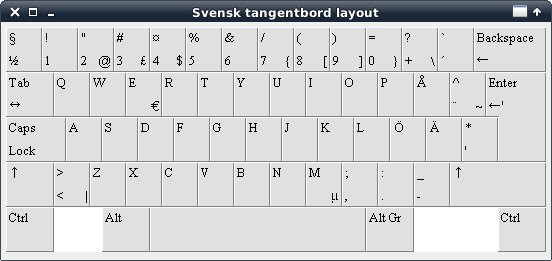
Edit: what happen if you want to see the keyboard layout (how the keys are arranged on virtual keyboard)? I have a solution to this too:
we create a shell script that will display a picture on the screen containing the keyboard's layout; for this we'll need x11-misc/gtkdialog
you can name that script like kblayout-, where xx is the language code (it's just a name, really)
#!/bin/bash

export script='input type="text" />/home/eugen/Pictures/Keyboard_Layout_Swedish.png140170'
gtkdialog --program=script
Later, you can create a keyboard shortcut that will launch this script whenever you want to see the keyboard layout (eg: Alt+Shift+S):
Comments
No comments yet
Be the first to leave a comment.
Leave a comment