Nowadays I am writing a WordPress plugin that involves accessing and upload file to google drive programmatically. This process implies the following steps:
request an authorization code from the Google Authorization Server
get the authorization code and then use it to send a POST request in order to obtain an access token from the Google Authorization Server
use the access token and upload the file
The authorization sequence looks like this:
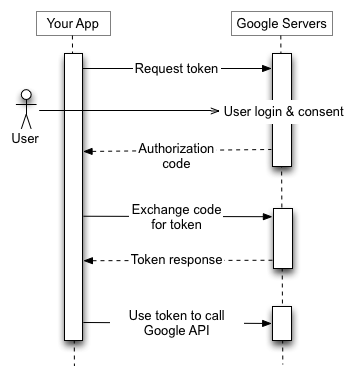
Of course, you can do all of these much simple by using the Google Client Library but I don't like this approach because it implies an external dependency and perhaps a complex chain of classes that are not really necessary (just convince yourself by reading my PHP example below). Below you can find a simplified approach of the above idea. It is a PHP code that encompasses the following blocks:
a function that launches the authentication process
a function that requests the authorization code
a function that requests the access token
a function that stores and/or load the access token to/from a local file
a function that returns either the access token or, in case it is expired, the refresh token
a function that uploads a file to the Google Drive associated to that access token
<!--?php $GAPIS = 'https://www.googleapis.com/'; $GAPIS_AUTH = $GAPIS . 'auth/'; $GOAUTH = 'https://accounts.google.com/o/oauth2/'; $CLIENT_ID = 'my-google-client_id'; $CLIENT_SECRET = 'my-google-client_secret'; $REDIRECT_URI = 'http' . ($_SERVER['SERVER_PORT'] == 80 ? '' : 's') . '://' . $_SERVER['SERVER_NAME'] . $_SERVER['SCRIPT_NAME']; $SCOPES = array($GAPIS_AUTH . 'drive', $GAPIS_AUTH . 'drive.file', $GAPIS_AUTH . 'userinfo.email', $GAPIS_AUTH . 'userinfo.profile'); $STORE_PATH = 'credentials.json'; function uploadFile($credentials, $filename, $targetPath) { global $GAPIS; $ch = curl_init(); curl_setopt($ch, CURLOPT_URL, $GAPIS . 'upload/drive/v2/files?uploadType=media'); curl_setopt($ch, CURLOPT_BINARYTRANSFER, 1); curl_setopt($ch, CURLOPT_POSTFIELDS, file_get_contents($filename)); curl_setopt($ch, CURLOPT_POST, 1); curl_setopt($ch, CURLOPT_RETURNTRANSFER, true); curl_setopt($ch, CURLOPT_HTTPHEADER, array('Content-Type : text/plain', 'Content-Length:' . filesize($filename), 'Authorization: Bearer ' . getAccessToken($credentials)) ); $postResult = curl_exec($ch); curl_close($ch); return json_decode($postResult, true); } function getStoredCredentials($path) { $credentials = json_decode(file_get_contents($path), true); if (isset($credentials['refresh_token'])) return $credentials; $expire_date = new DateTime(); $expire_date->setTimestamp($credentials['created']); $expire_date->add(new DateInterval('PT' . $credentials['expires_in'] . 'S')); $current_time = new DateTime(); if ($current_time->getTimestamp() >= $expire_date->getTimestamp()) { $credentials = null; unlink($path); } return $credentials; } function storeCredentials($path, $credentials) { $credentials['created'] = (new DateTime())->getTimestamp(); file_put_contents($path, json_encode($credentials)); return $credentials; } function requestAuthCode() { global $GOAUTH, $CLIENT_ID, $REDIRECT_URI, $SCOPES; $url = sprintf($GOAUTH . 'auth?scope=%s&redirect_uri=%s&response_type=code&client_id=%s&approval_prompt=force&access_type=offline', urlencode(implode(' ', $SCOPES)), urlencode($REDIRECT_URI), urlencode($CLIENT_ID) ); header('Location:' . $url); } function requestAccessToken($access_code) { global $GOAUTH, $CLIENT_ID, $CLIENT_SECRET, $REDIRECT_URI; $url = $GOAUTH . 'token'; $post_fields = 'code=' . $access_code . '&client_id=' . urlencode($CLIENT_ID) . '&client_secret=' . urlencode($CLIENT_SECRET) . '&redirect_uri=' . urlencode($REDIRECT_URI) . '&grant_type=authorization_code'; $ch = curl_init(); curl_setopt($ch, CURLOPT_POSTFIELDS, $post_fields); curl_setopt($ch, CURLOPT_POST, true); curl_setopt($ch, CURLOPT_RETURNTRANSFER, 1); curl_setopt($ch, CURLOPT_URL, $url); $result = curl_exec($ch); curl_close($ch); return json_decode($result, true); } function getAccessToken($credentials) { $expire_date = new DateTime(); $expire_date->setTimestamp($credentials['created']); $expire_date->add(new DateInterval('PT' . $credentials['expires_in'] . 'S')); $current_time = new DateTime(); if ($current_time->getTimestamp() >= $expire_date->getTimestamp()) return $credentials['refresh_token']; else return $credentials['access_token']; } function authenticate() { global $STORE_PATH; if (file_exists($STORE_PATH)) $credentials = getStoredCredentials($STORE_PATH); else $credentials = null; if (!(isset($_GET['code']) || isset($credentials))) requestAuthCode(); if (!isset($credentials)) $credentials = requestAccessToken($_GET['code']); if (isset($credentials) && isset($credentials['access_token']) && !file_exists($STORE_PATH)) $credentials = storeCredentials($STORE_PATH, $credentials); return $credentials; } $credentials = authenticate(); $result = uploadFile($credentials, 'my_file.txt', ''); if (!isset($result['id'])) throw new Exception(print_r($result)); else echo 'File copied successfuly (file Id: ' . $result['id'] . ')'; ?-->
Comments
7 comments
Hi Just try your script and work, but the problem, all file in google drive named untitled any way to fix this thanks andreas
hi 'm getting below Error Please help me to rectify. Fatal error: Uncaught exception 'Exception' with message 'DateInterval::__construct(): Unknown or bad format (PTS)' Exception: DateInterval::__construct(): Unknown or bad format (PTS) in C:\wamp\www\google-api\launch.php on line 103
Hi i need to upload file on particular folder of drive. can you help me please for that?
Use the uploadFile function and specify the filename in the format folder_id/filename where folder_id is the Google Drive Folder ID for the folder where you want to upload (eg. 0B95k2kr1bG9fODZDY0VFMGNTWTA) and the filename is your filename (eg. sample_file.txt). How do you find out what is the Google Drive Folder ID for a specific folder? Open your Google Drive in your web browser, navigate into that folder. The address bar could look something like this: ://drive.google.com/drive/u/0/folders/{your-folder-id} The current folder ID is the unique identifier that follows the /folder/, ie. {your-folder-id}.
Where can I specify the file name in your code above? Currently when uploading files the are just named 'untitled' in Google Drive.
Error: invalid_request Invalid parameter value for redirect_uri: Uri must consist of printable ASCII characters: http://localhost/drive upload test/finale.php any possibility to fix this
The information you provided are very generic, it's hard to understand what you did and what answer you've got. Please address any GoogleAPI question to Google Developer Community forum.
Leave a comment