I have a KVM/Qemu 2.1.2 hypervisor installed on a Linux x86_64 system (kernel 3.18.8). On KVM I installed a Windows 2003 Server guest where usually I do my MS-SQL work. I noticed that while typing inside the Windows guest the host CPU spikes to 100%. Moreover, the keyboard doesn't respond in a timely fashion. I thought that it is because of the Windows application I use (it depends on .net and thus everything is possible). I googled around and finally I found a solution. It turns out that Windows tries to verify a keyboard interrupt on a i8042 controller (which is the serial controller the KVM/Qemu implements) too many times. Perhaps the default value implemented by Windows 2003 Server is too high, I really don't know. All I know is that we have to adjust it such that it tries only once. In order to fix keyboard delay on KVM Windows guest you should open the Registry Editor inside your Windows guest and look for the following key:
HKLM\SYSTEM\CurrentControlSet\Services\i8042prt\Parameters
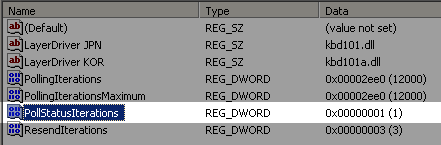
Now check to see if there is a property called PollStatusIterations out there and if it's not then define it as a DWORD type. Set its value to hexa 1:
Now close the Registry Editor and restart the Windows guest. After restart everything should work fine. If it works please let me know, add a comment below.
Comments
1 comment
Hello, I ran into this exact problem with Windows 2012 Server.For me, this problem occurs only when SMP is enabled. Anyway, your fix worked perfectly. Thanks!
Leave a comment