I was never interested in web front-end development. I "did my time" with desktop front-end development for many,many years. From time to time I was forced to write web applications that usually had a more/less complex back-end and a minimalistic UI (hardly few JavaScript functions and certainly no CSS need). Anyway, time is changing, people evolve and so do I. So it came the time when I had to change the navigation system in few applications I wrote. Of course, I could borrow some code from the Internet, there are tons of examples. There are even tools that generates automatically a CSS tabbed navigation menu with just one click. But I am always interested in learning, I was never happy being a spectator. So here is my version of CSS tabbed navigation:
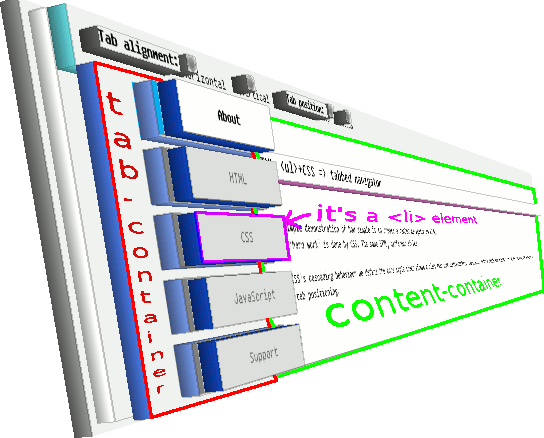
one <div> container that hosts a <ul> list of <li> items; each <li> includes one <a> anchor and together they represent a menu-item (we call this "the tab-container")
another <div> container that hosts the content of whatever the active menu represents (we call it "the content-container")
A CSS tabbed navigation menu can be oriented both horizontally or vertically:

When it comes to tab position they may be aligned vertically either on top (see above) or bottom (see below):

A tab oriented vertically looks like this:
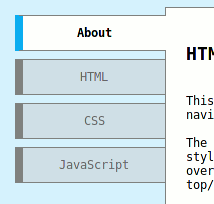
The way these elements are positioned, the way they reacts when they're selected or mouse-hover'ed it's just a matter of creating a Cascade Style Sheet (CSS) for each element (such as div, ul, li, a) where their common denominator is encapsulated in a common CSS class. What makes them look/behave differently when they change their tab orientation/position we are going to encapsulate on different CSS classes. So we need a CSS class for the <ul> container where we declare for instance that we don't want bullets on list, or the text to be aligned centred. This attribute is common, no matter what orientation/alignment the tab may have. We call this class "tab-container". The attributes that make the tabs look differently base on their orientation/position will be kept in two separate classes named "horizontal" respectively "vertical". The attributes that make a horizontal oriented tab look differently will be kept in a distinct class named "bottom". Due the fact that the container that encapsulates the content (the content-container) must be positioned relatively to our tabbed navigation container (tab-container) we will define the way that the content-container looks or is positioned in a separate class named "content-container". Take a look at the 3D view taken from the demo page I published here:
Because one picture tells more than one thousands words I guess a demo tells more than everything I wrote above. That's why I made a demo page here where you can do both, play with the CSS tabbed navigation and also check its source code. Last note: the layout works cross-browser. For instance I've tested on FF, IE8 and Chrome and it looks awesome. @Edit: the CSS basics can be easily learned at http://www.codecademy.com/en/tracks/web. I mean even my mother could learn CSS using that tutorial :)
Comments
No comments yet
Be the first to leave a comment.
Leave a comment