I don't want to install and use the Xfce calendar plugin, because 99% of time I don't need it (so why should I keep the laptop memory busy all the time with something that I rarely use?) As alternative I just found out that Linux utils comes with a application called simply "cal". So at the console you can type just "cal" and then something like the text bellow will be shown: January 2012 Su Mo Tu We Th Fr Sa 1 2 3 4 5 6 7 8 9 10 11 12 13 14 15 16 17 18 19 20 21 22 23 24 25 26 27 28 29 30 31 @Edit: I am lazy so I don't even want to open the console and to type 'cal', like suggested above. Q: How can I use the same calendar but easier? A: Use the bash script below and define a keyboard shortcut (such as Ctrl+Alt+C or something available) to call this script:
#! /bin/bash
ICON_RES="scalable"
ICON_EXT=".svg"
day="$(date +%_d)";
title="$(date +'%B %Y')"
time="$(date +'%H:%M:%S')"
flatcal=$(cal);
msg=${flatcal//$day/<span style="text-decoration: underline;"><b>$day</b></span>};
notify-send "Calendar ($time)" "${msg}" -i "/usr/share/icons/Tango/${ICON_RES}/apps/date${ICON_EXT}"
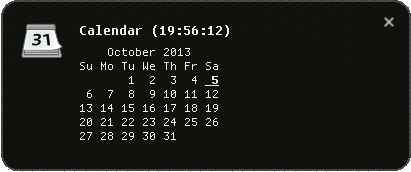
Here is the result:
If you would ask why somebody should bother to reinvent the wheel where there are plenty of applets/widgets out there, the answer is simple: why not learning something by reinventing the wheel? And maybe it's not about reinventing but improving the concept.
Comments
No comments yet
Be the first to leave a comment.
Leave a comment